小兔网


Deprecated: Required parameter $toggle follows optional parameter $filterGroups in /home/wwwroot/zhishitu.net/plugins/content/easycontentrestriction/easycontentrestriction.php on line 289

Deprecated: Required parameter $subnum follows optional parameter $n in /home/wwwroot/zhishitu.net/plugins/content/easycontentrestriction/aop/AopClient.php on line 802

Deprecated: Required parameter $charset follows optional parameter $n in /home/wwwroot/zhishitu.net/plugins/content/easycontentrestriction/aop/AopClient.php on line 802

Deprecated: Required parameter $length follows optional parameter $start in /home/wwwroot/zhishitu.net/plugins/content/easycontentrestriction/aop/AopClient.php on line 815

Warning: Undefined variable $allowedUser in /home/wwwroot/zhishitu.net/plugins/content/easycontentrestriction/easycontentrestriction.php on line 315

Warning: Undefined array key "pay" in /home/wwwroot/zhishitu.net/plugins/content/easycontentrestriction/easycontentrestriction.php on line 241

互盾SD内存卡数据恢复软件是互盾信息科技新开发的一款针对各类内存卡进行数据恢复的工具,知识兔支持U盘、SD卡、miniSD、microSD、TF卡、SDHC卡、SDXC卡、记忆棒、闪存卡(Flash Card)、CF卡、XD图像卡、SM卡、MMC卡等。

互盾SD内存卡数据恢复软件

基本简介

互盾SD内存卡数据恢复软件对硬盘、移动硬盘等存储设备也具体良好的兼容性。该软件目前支持多种文件类型的数据恢复,包含图片、照片、视频、音频、压缩包、应用程序、邮件、Office文档(Word、PPT、excel电子表格等)、CAD文件等各种常用的文件类型。

使用方法

1、解压压缩包,知识兔打开安装程序进行安装;

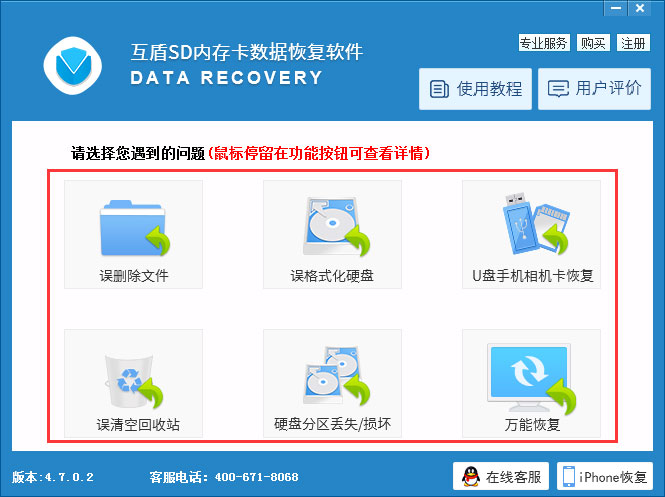
2、打开后选择恢复类型;

互盾SD内存卡数据恢复软件

3、知识兔选择内存卡磁盘;

互盾SD内存卡数据恢复软件

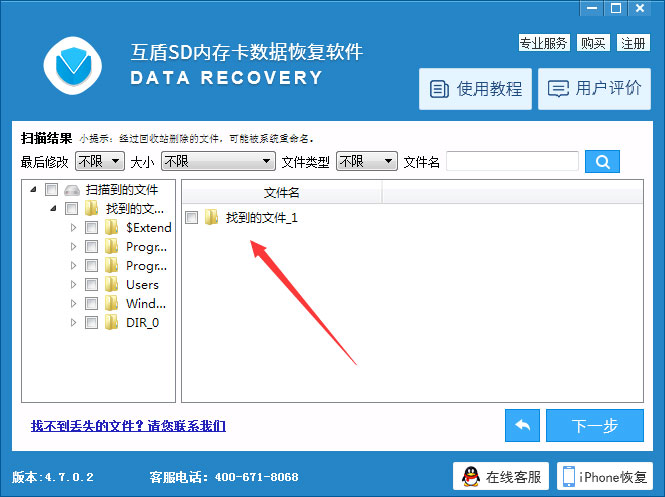
4、等待扫描完成后选择需要恢复的文件;

互盾SD内存卡数据恢复软件

5、下一步即可恢复。


下载仅供下载体验和测试学习,不得商用和正当使用。

下载体验

请输入密码查看内容!

如何获取密码?


点击下载